Showing posts with label FCC. Show all posts

Monday, April 13, 2026

Oracle FCC: Which Metadata Editor is Best for Catching Errors?

Those who have worked with Oracle EPM for several years know there is usually more than one way to do things (although we consultants sometimes think that "our" way of doing something is the correct way!). With Oracle FCC and Planning there are at least five different ways of editing metadata (entities, accounts, etc.). These options have varying levels of edit checks available, at least for FCC. This post will talk about the five with a particular focus on edit checks. There is no one "right" way here, but there are "better" and "not as good" options. 


Option 1 - "simplified" or "new" metadata editor

This option is built into the software and is accessed by selecting Navigator icon > Overview (from Application menu section) > Dimensions > select dimension. This option presents the metadata in a grid format where parents can be expanded/collapsed, columns moved around, valid choices presented as dropdowns, etc. Attributes can be copied and pasted across multiple members which is helpful.

There are pros and cons related to edit checks. If you try entering an alias with more than 80 characters, you are allowed to do so but you can't save [thanks to Jake Turrell for the info]. Kinda good (can't save) but kinda bad (allowed to type the extra characters). But where this editor shines with FCC are the visual attribute edits. Here, Average is not a valid exchange rate type for FCC and the software is adding the red border to indicate that. This change was made in the old editor (option 2) and in the new editor, Average isn't even a choice. But it still shows the field as something that needs to be corrected.


Disclosure: this is my default choice out of the options presented but will use another option below when needed, so keep reading.


Option 2 - "classic" or "old" metadata editor

The classic/old Essbase metadata editor is accessed by selecting Navigator icon > Dimensions (from Create and Manage menu section) > select dimension. This option was the original metadata editor in FCC and has been available for several years after Oracle said they were going to remove it (when the "new" one came out). I think there are larger priorities and if people are used to using this editor with earlier versions or with Essbase or with Planning then why not. 

The metadata is presented as a hierarchy but each member must be edited individually: no copying/pasting to multiple cells like in option 1.

However, as far as editing goes, it does lack some features. It will correctly not allow an alias to be entered that's greater than 80 characters [again, thanks to Jake]. But it will allow for invalid attribute choices to be selected. They may be valid for Essbase and/or Planning, but not everything is valid for FCC. Here, the Average option is not valid for FCC but can be selected and saved and there is no notification that this will be a problem.


Option 3 - Oracle Smart View

Smart View can also be used to edit metadata directly in Excel. This option does have some ease of use: built in extract/submit buttons, cut/copy/paste, Excel features like AutoFilter and use of functions to build metadata components, etc. But it lacks the edit checks as shown above.

I do use this one frequently when doing initial metadata building. It's commonplace to begin a project where someone gives me an Excel file with the chart of accounts, legal entity hierarchy, etc. 


Option 4 - Export to text file, make changes, upload

This option is probably the simplest in theory, but the hardest to make work successfully. Export the metadata to a text or CSV file, manually make the changes, and load back in. With this option there are no edit checks and lots of room to create errors (like leave out a comma [delimiter]) but technically it does work.


Option 5 - Oracle Enterprise Data Management

Why worry about edit checks if you can eliminate the errors altogether? Enterprise Data Management is a part of the Oracle Cloud EPM suite that adds governance, rules, workflow, and other features around metadata management. Each target application can have the edit checks around what's valid and not valid set up. This is usually an additional cost (unless you already have Enterprise licensing for Oracle Cloud EPM and can work with less than 5,000 members) and does involve a project to implement but there are a lot of benefits that none of the other options can match.


These are five of the common ways to work with FCC metadata. All of these are valid approaches although the manual editing with the text file is probably the least likely to be used. If administrators are still working with option 2 (the old editor) then some serious consideration should be given to switch to option 1 (the new editor). The grid format allows editing multiple members at the same time and the visual attribute edits (the red borders) are two features that the old editor simply can't match.


Monday, March 3, 2025

FCC Consolidation Status - "Completed" does NOT mean Successful

UPDATE - September 2025 - this is looking to be fixed. A consolidation with this error now shows Error on the main jobs screen.


FCC has a similarity to Microsoft Excel on manual calc. Change data, then press F9 for the calculations/formulas to run. In FCC, the similar process is consolidation, just like it was in its predecessors MicroControl, Hyperion/Enterprise, and HFM. This process is central to how all four products work. Unlike those great products of the past, however, FCC consolidations have one big deficiency: the status reporting. Did the consolidation work or not? Without going to multiple screens, you don't always know.

Look at these two consolidation results from the Jobs listing. One of them failed and one succeeded. Can you tell which is which?


Looking at the details of one of the consolidations, can you tell now? No, you can't.


Actually, this consolidation failed. Clicking the word "Completed" shows that the consolidation didn't even run.


It could be that "Completed," internally, means someone started the process, the process started running the software code that Oracle told it to do, and the code reached the end of the process. Whether the process actually encountered an issue during that; well, that's up to you the user/admin to figure out. In my mind, this is like saying whether I have eaten. I start the process of eating: something goes in mouth, I chew, I swallow. Ok, I ate something. Did I like it, did I hate it, did I get sick, did I eat something poisonous and die, am I still hungry: who knows.

I posted an enhancement idea on Oracle Cloud Customer Connect on this over four years ago. Maybe everyone is okay with this level (I want to use other words here but am trying really hard not to) of status reporting. I'm thinking that Oracle can do better. If you want to upvote the idea - please do -  here's the link:

https://community.oracle.com/customerconnect/discussion/558521/consolidation-jobs-should-indicate-error-not-just-complete


Since FCC has been reporting consolidation status this way for so long, you'd think everyone would know about it. That's not true - I just had this conversation with a client today. The issue appeared in downstream processes: reporting was weird, data wasn't correct, etc. So if your consolidations run but you don't get the results you expect, unfortunately a little digging is required.


Monday, February 10, 2025

Financial Reporting - Another Nail in the Coffin

 Logging into a test EPM environment after the 25.02 release (February 2025), I saw this message.


Oracle announced in the release notes that support for Financial Reporting in EPM is ending in June 2025 and this message is a confirmation. As noted above, this transition has been planned for some time now.

Fortunately, it's not a hard process to convert existing Financial Reporting reports to Reporting. But before trying to migrate reports, check first that they run and have no errors (if a report doesn't work now, it's not going to work later). Also check with the users about which reports need migrating.

Click the Navigator and go to Reports. On the Financial Reports tab where the FR reports are listed, there is an icon on the far right for each report for migration. Click the icon to begin the migration.


When prompted, click on the desired folder for the new report. If the folder isn't there, then cancel, create the folder on the Reports tab, and then run the migration.


After the process runs, a confirmation message is shown.


There is also a way to migrate all of the reports at once. Click the Migrate All button at the top right. Choose the top level destination folder and optionally select whether to recreate the existing folder structure.


The status of the process can be seen in the Jobs screen.


A common sense approach would be to migrate everything, deal with any issues (see below), and then migrate individual reports again if they require updating before the conversion is complete.

This process seems too easy, right? The documentation - link below - has two pages on (a) dealing with migration errors and (b) the differences between the two reporting tools. Depending on the report design and build, there may significant work still to do.


So the next step, even if no errors are reported, is to edit each report and check for validation errors (open the report in edit mode and see if the red bar shows at the top of the screen) and verify the output with three objectives: does the report run, is the content correct, and is the formatting correct. 

For example, open a report in edit mode and you may see something like this:


When I've done the migration, I've noticed that the report/folder security within Financial Reporting is not copied over. I can't say whether this is normal, but also plan to verify and apply security as needed.

Last, the Financial Reporting books do not migrate. These will need to be recreated.

Admins should start on this migration soon if they haven't already. When Oracle refers to the "June 2025 (25.06) update" above, remember that does not mean the end of June - it's the third Friday in June. 


Monday, January 13, 2025

FCC - Loading data as admin not working (issue, workaround, and fix)

Some FCC applications have an issue where data loads done with an admin ID are not calculating correctly after the data load. What is happening is that the data status isn't correctly being set to impacted and so the subsequent calculation/consolidation doesn't bring forward opening balances, calculate movement, etc.

The workaround for this is simply to do the data loads with a non-admin ID. Or do something that impacts all status, like a database refresh.

Sources tell me that Oracle is planning (safe harbor statement applies) to do an off-cycle update to the test environments this week, probably on Jan 14. Once that happens, admins can test the fix in the test environment and then file an SR to request that their production environment gets an early update. Both the test and production updates would happen during the daily maintenance cycle, which can either be run on the normal schedule or on-demand using EPM Automate. Or, if the early update is not desired, then continue with either workaround until the regularly scheduled production update.


Update: Jan 14: The test pods were updated to 25.01.31 overnight from 25.01.30. Early testing is showing the fix to be in place.


Friday, May 31, 2024

FCC - Showing Calc Status on a Report

With HFM and Financial Reporting, there is a function that pulls the calculation status into a report. This is useful for those who want to ensure the data has been consolidated when looking at the results. I've seen conditional formatting used in conjunction with this to alert the users that the data is suspect if the consolidation hasn't been ran.

With FCC and Reporting/Narrative Reporting, there isn't such a function. But there's still the same need. I filed an idea lab submission to request the function. I thought I (and my clients) was out of luck, but then I thankfully ran across a simple solution, and it's built in!

When building the report, look at account FCCS_CSTATUS FILTER. This account just doesn't give you some number that you have to convert - you get the proper text status. Along with specifying the account, you have to set the point of view to FCCS_No Data Source (which isn't used often) and FCCS_No Movement. The rest of the point of view should be normal for other data retrieves, but the intercompany and custom dimensions should be set to FCCS_No Intercompany or No custom.


When the report runs, it looks like this. Note this report is also showing the out of balance amount. The column headers for the data source and the movement are hidden. Not shown, the rows for the report are level 0 entities.


And being an account, this means that the calculation status can be pulled into Smart View with either ad hoc or functions, which is a big bonus.


Thursday, September 7, 2023

FCC - Doing Away with Separate Loads for Balance Sheet and Income Statement

THIRD UPDATE - Feb 2025

In the 25.02 release this functionality was updated and should work. Please check the release notes and the doc for instructions.


TWO UPDATES - Sep 2023

First, I have to apologize - I got the name of the variable wrong. It should be: NewLoadYTDClosingBalanceInput

Second, Oracle product management posted on Cloud Customer Connect yesterday that the feature isn't working correctly for profit and loss accounts and it will be addressed. No indication on timeline.


It's been a while since the last blog post so thought I'd do one on a new feature that's everyone has been wanting to see: loading BS and PL data together instead of separately. The funny (well, not funny) thing is that I missed the announcement - it was listed down in the Actions and Considerations section of the release notes instead of in the regular new features section. A friend pointed it out to me and I'm thankful they did.

The August release (23.08) introduced a change where you don't have to do separate loads for the balance sheet and the income statement in order for the system to reverse out the prior period closing balance. More specifically, the system would reverse the prior period's periodic closing balance and carried over the income statement from the prior year in the first period. Now, the system reverses the YTD closing balance from the prior period and does nothing for the income statement accounts in the first period.

I tried this out for myself and got the process to work. There are a couple details that aren't obvious in the current documentation, so I'm sharing them here. One is the next line and one is at the bottom.

First, there is a substitution variable that is required to enable the process: NewYTDClosingBalanceInput.


Next, set up the metadata so that income statement accounts have the FCCS_Mvmts_NetIncome member assigned as the default movement. The balance sheet accounts should already have the assignment. Note: it is recommended to keep FCCS_Mvmts_NetIncome as a level 0 member and not make it a parent. I thought about making it a parent with the non cash income statement movements as children as well as a regular income statement movement and was advised against it.


Next, in Data Exchange, populate the movement dimension for both balance sheet and income statement accounts with FCCS_ClosingBalance_Input. Here, I'm using a SQL statement to map multiple dimensions at once as it's faster than mapping dimensions separately, but either way works. Note: your movement dimension may not be UD7, so use the appropriate field. And yes, this is the new Data Exchange interface to which we should all be transitioning.


Now, when data is loaded and consolidated, the movement and reversals are properly calculated - top two rows have an asset and the bottom two rows have an expense.


I need to do further testing and verification but so far so good. 

The other not so obvious detail is that the movement member must be somewhere under FCCS_Mvmts_SubTotal. So if you also have statistical data to load, which normally goes to FCCS_No Movement, that will seemingly need to be a separate load.

I've already changed the design for two projects to use this feature. The time for the design change and the extra setup should easily be recouped in the quicker loads (one vs two).


Monday, March 6, 2023

FCC Release 23.03 - Metadata Validation for Movement Members

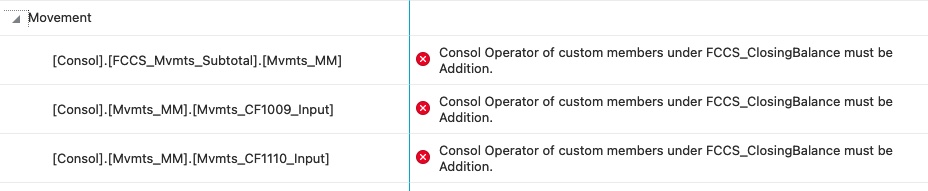
In the 23.03 release of FCC there is a new metadata validation that requires that all members under FCCS_ClosingBalance have a consolidation operator of Addition. On the surface this makes sense; however, it will cause major issues with cash flow.

It is common for cash flow to require various types of manual adjustments and calculations that are not part of the closing balance calculation. But, if a movement member is not under FCCS_ClosingBalance, then the data does not consolidate.

So what I and many others have done is to put these members somewhere under FCCS_ClosingBalance with a consolidation operator of Ignore. That way the data consolidates and does not impact the closing balance.

With the 23.03 release, when a metadata validation is run, this happens:


I filed an SR for the company I'm currently working with for this issue. Unless Oracle removes the restriction that members must be under FCCS_ClosingBalance to consolidate, I expect that this validation will get pulled back.

Monday, February 27, 2023

Oracle EPM: Hierarchy Calculations

Most implementations have some statistical calculations, particularly with accounts. There are multiple levels of calculation complexity. Member formulas is usually the go-to place to write these; however, for simple calculations, there's another option. And it has a benefit that member formulas don't have!

Create an alternate hierarchy with the parent member representing the result and the children representing the inputs. Then use the consolidation operator to add/subtract/multiply/divide or calculate a percentage. In the below example, FCCS_Gross Profit is being divided by FCCS_Gross Sales to calculate a gross margin percentage. And with the percentage option there is no need to multiply the results by 100.

If the calculation needs parentheses, then create a mid level parent to represent that part of the formula.

Now, the benefit. A user can view the result on a report, data grid, etc. and then drill down into it to see the components. The result member is just a parent member, after all. So that's helpful.


Wednesday, January 11, 2023

FCC January 2023 Update - DO NOT CHANGE Dense/Sparse!

Hello and welcome to 2023! The first blog post this year is a warning regarding the FCC (Financial Consolidation and Close cloud service) update for this month.

The 23.01 (January 2023) release somehow opened up the dense/sparse settings for the dimensions in the application. Dense and sparse (if a dimension is not dense then it's sparse) relate to how the underlying Essbase database is structured for saving data. Below, the Period and Movement dimensions are set to Dense (checkmark enabled).  If your application shows only the Account as dense, see the bottom of this post.

The dense/sparse column is normally read-only (greyed out) but as you can see the column is editable. Do not make any changes to this! Untold calamities will occur - seriously, there is no telling what will work and not work. Insertion rules, for one, will have problems. Oracle has already worked through the optimal dense/sparse settings, determined the optimal setup, and built the application around them. A fix to put the setting back into read-only mode is under development.


If your application shows only the Account as dense, then consider running the migration to make Period and Movement dense. There are several benefits, the biggest being the consolidation time will be a lot quicker.

There are several steps to do. The process is not hard, but should be done in test to confirm, particularly if insertion rules exist. Here is the link for the documentation (note if two rows of text show this is one link that is wrapping on the screen).

https://docs.oracle.com/en/cloud/saas/financial-consolidation-cloud/agfcc/migrating_movement_period_dense.html


Tuesday, May 17, 2022

Consolidation Dimension, DSO, and Solve Order

With FCC the change to DSO (where the movement and period dimensions are dense) really speeds everything up. One area that has still seemed slow involves QTD and YTD reporting. The fix for this is to adjust the solve order for the consolidation dimension. All of the dynamic parents should have a solve order of 51 (not 50 or 52 but 51).


This change is scheduled to be pushed to the pods with the June 2022 update.

In case you think I have a crystal ball or a hotline direct to the development team, you're right, I do. But actually I found out about this on a cloud customer connect post to the FCC forum. So even if you don't have a question to post, there are still benefits to following the forum and finding out what others are saying.

By the way, here's the original cloud customer connect post. See the bottom of the responses for the details.

https://community.oracle.com/customerconnect/discussion/610242/making-period-and-movement-dense-report-performance-issues-with-qtd-ytd-views#latest


Wednesday, November 25, 2020

Did the FCC consolidation work?

You run a consolidation in FCC (or FCCS as originally known), wait, maybe wait some more, and then you go to the jobs list and see the status is complete. Great! But then you look and see data isn't there or the data status is unchanged. What gives?

A consolidation job status of "complete" DOES NOT mean success or fail. It means simply that the process has finished running. But what you really want to know is the success or fail status. Where do you find this?

In the job listing click on Consolidate to see the details.


Here, you will see some details about the POV and how long the job took. 


But you STILL WON'T know whether it succeeded or not (but if the time duration is really quick then failed is probably the answer). Click Completed at the top left by Job Status.

There, now you get to see whether the consolidation succeeded or failed. Whew!


If you think there should be a better way, can you do anything about it! YES! On Cloud Customer Connect there is an idea posted already. What you can do is to "upvote," meaning click the thumbs-up icon. After clicking, either add a comment if you want or click Skip. The more companies that like an idea, the more likely it will be considered. You can also lobby your Oracle contacts when you see them on calls, etc. Let your voice be heard! Here is the link - both as a link and as raw text for those who don't like clicking links.

https://cloudcustomerconnect.oracle.com/posts/8d62090b81

https://cloudcustomerconnect.oracle.com/posts/8d62090b81


Thursday, June 4, 2020

FCCS Smart View - showing both label and alias/description

I haven't done a blog post in a while so it's past time for one. And after reading this and seeing my previous post, I am glad there is continuity.

Let me start by saying I'm liking FCC. It's the next evolutionary step in Oracle consolidation just like HFM was an evolutionary step above and beyond Hyperion Enterprise. But sometimes with these processes there is a step back. And yes, there are bits of Enterprise that were never replicated in HFM and are still missed to this day. This post describes one area like this, offers a workaround, and asks for a favor.

For HFM users, and this was true for Enterprise, when you used the spreadsheet add-in of the day to do ad hoc analysis you had a choice something like this. Ignore Indentation and Ancestor Position - they are headings for other fields that are hidden by the expanded dropdown.


So when you're in an ad hoc grid you can choose to see the member labels, member descriptions, or both. Both would look like 100 - Petty Cash.

When using Smart View with FCC or Planning, the same dropdown has different selections.


Both of these are versions of the member label. To see the alias or description, there is a second button that appears on the ribbon called Change Alias.


With these options, choosing None will show the labels and choosing one of the aliases (this application only has one called Default) would show the alias instead.

THERE IS NOT AN OPTION TO SHOW BOTH. And this is the departure from HFM, etc.

So, here's the solution. Note this wasn't my idea but was proferred and confirmed by people smarter than me in these areas. Create another alias and populate it with the combination of label and the regular alias. Users can choose that as they desire. You can also use it for reporting if you want. The downside is you have two fields to maintain instead of just one. If you are using EDM, DRM, or other metadata management tool, then you can use a formula to calculate this field. Regardless of how you do it, just watch the overall length though.

Now, the favor. There is something you can do. If you read the previous post on this blog, it describes how to go to Oracle Cloud Customer Connect and submit and like ideas. Someone already created an idea for this topic. So here's the favor: if you agree, please log into CCC and like this idea. Here's the link. I have seen ideas that get liked in this fashion make it to the product, so it is not a pointless exercise. Guaranteed, no, but not pointless.


I think FCC is great, but I do miss the simple things in life sometimes.